Customer portal
Initiative · Delivery & readiness
SeptemberNovember
Platform teamData team
Dates · Resources · Planning window PlanspaceSign in
 PLANSPACE + QUEUESPACE
Planspace gives the work direction. Queuespace gives teams a place to carry it out. Connect them when you are ready to turn a planning decision into shared progress.
THE CONNECTION, AT A GLANCE
One published initiative. One ticket per team, per phase.
Initiative · Delivery & readiness
Reported progress and logged hours return to the published view
Illustrative initiative and progress · sample data
THE CONNECTED VIEW
A published initiative brings team progress, logged work, and planned effort into the same view. Keep everyday tickets separate while project tickets retain their initiative and phase context.
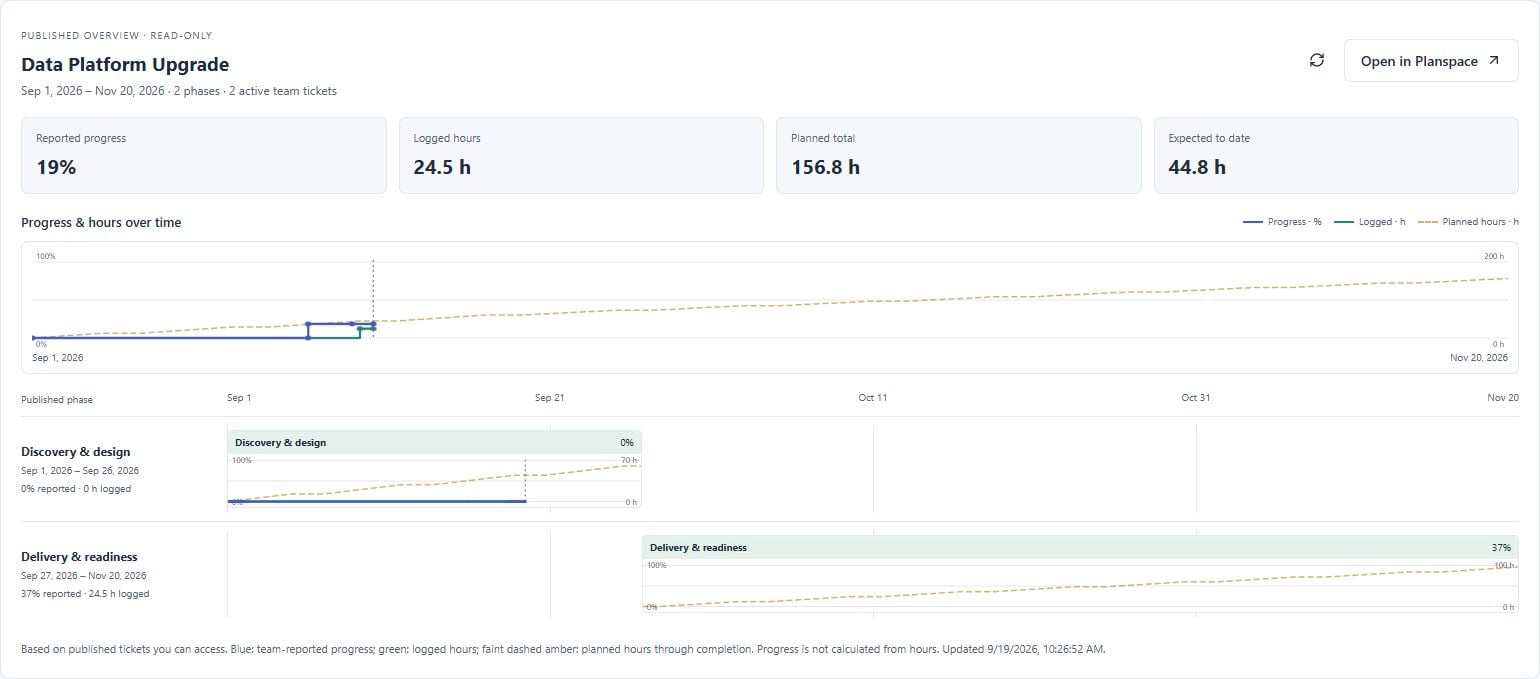
One team ticket per phase. Team members contribute notes and work logs; the designated lead owns the progress slider.
Recorded hours add context to the progress report. They do not calculate or replace the completion percentage.
The faint dashed line extends to the published finish. Compare logged effort with the planned total and expected hours to date.
CLEAR RESPONSIBILITIES
Initiatives, phase dates, participating teams, resource assignments, and the overall planning window.
Team ticket notes, scheduled work sessions, logged hours, and the lead’s manual progress updates.
DELIBERATE SETUP. USEFUL FEEDBACK.
Administrators approve the account relationship and workspace pairing. Both apps need paid access; subscribing alone does not connect them.
Preview and publish one initiative at a time, or publish a single phase. Later planning changes are reviewed and published manually.
Team members add notes and log work on their team’s phase ticket. The designated lead updates progress with the slider.
Progress and reported hours return automatically. Review published initiative trends in Planspace while everyday ticket work stays in Queuespace.
Reported by the team lead
PROGRESS IS A JUDGMENT
Twenty hours logged does not necessarily mean a phase is halfway done. Team leads control their progress reports. Logged time and planned hours add the context managers need to understand the trend.
FLEXIBLE ON THEIR OWN. STRONGER TOGETHER.
Use either app on its own. Bundle paid access to both for a 10% discount on the combined subscription price.
3 Plan Spaces + 3 Queuespace shared workspaces.
20 Plan Spaces + 20 Queuespace shared workspaces.
USD examples shown with monthly billing. Annual billing saves 20% before the 10% bundle discount. Paid membership is subject to fair use and provider limits. Review the selected offer at checkout; linking the apps does not change your subscription automatically.
FROM INTENTION TO FOLLOW-THROUGH